Last month I wiped my old MacBook Pro, reinstalled macOS from scratch, and spent the evening setting the machine back up. Fresh terminal, fresh SSH key, fresh git config. Cloned one of my repos to start working again, made a small change, committed, pushed.
GitHub rejected it.
! [remote rejected] main -> main (push declined due to email privacy restrictions)
error: failed to push some refs to 'https://github.com/you/your-repo.git'
First thing I assumed was that I’d broken authentication somewhere in the setup. New SSH key, maybe I’d forgotten to add the public key to GitHub, something like that. But the error wasn’t complaining about authentication. It was very specific about what it didn’t like: my commit was trying to publish an email GitHub didn’t want me publishing.
This is gh007. And the reason I’m writing about it is that the obvious fix didn’t work on my first try, the second attempt also didn’t work, and the version that finally pushed had a single flag I’d never heard of before that day.
TL;DR: gh007 fires when your commit’s author email isn’t on your GitHub verified emails list. You change your git email and run
git commit --amend, but it still rejects. The catch is that amend doesn’t actually rewrite the author line unless you add--reset-author. That’s the one flag that fixes it.
The fix I tried first. And the one I tried second
I ran git config user.email to see what address git thought was mine. It printed an old personal email from a GitHub account I’d stopped using two years ago. Restoring my dotfiles from backup must have dragged the old setting along with it. Source of the problem, sitting right there.
So I fixed it:
git config user.email "shameem@example.com"
git commit --amend --no-edit
git push
Same gh007.
That was the confusing bit. I’d just changed the email. The amend had run without any complaint. Git hadn’t thrown a warning. GitHub shouldn’t have had anything left to object to.
I pulled up the new commit to look at it:
git log -1 --format='%an <%ae>'The author line was the old email. Unchanged. After the amend.
And that’s when I learned something about git I’d assumed worked differently. git commit --amend does not touch the author. It updates the committer (the person applying the change at the moment you ran the command) and lets you edit the commit message, but the author line is treated as historical record, and git leaves it alone out of respect for that history. If you want to overwrite it, you have to tell git explicitly. The flag is --reset-author.
I don’t know why this isn’t the default, and I’m not sure anyone does. I only know that almost every Stack Overflow answer for gh007 leaves it out, which is why so many people hit the same wall I did and spend fifteen minutes trying to work out why nothing is changing.
Here’s what actually happens on the two paths, side by side:
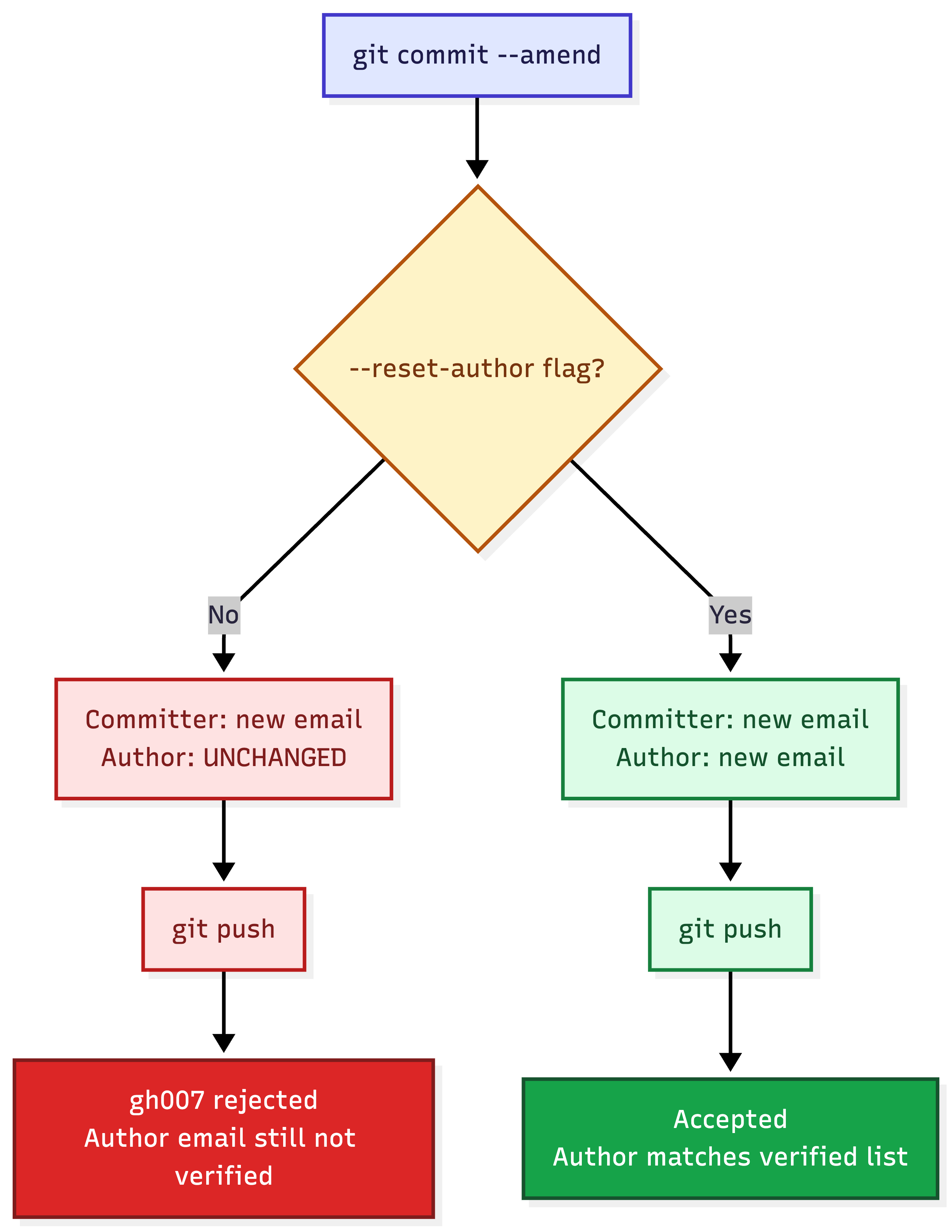
The version that pushed
git config user.email "YOUR_GITHUB_ID+YOUR_USERNAME@users.noreply.github.com"
git commit --amend --reset-author --no-edit
git push
Accepted on the first try. The author line now matched a verified email on my GitHub account, and the privacy block had nothing to flag.
I used GitHub’s noreply address rather than my real email. Partly because I don’t love leaving a working inbox scraping-distance from every bot that crawls public commits on GitHub, partly because it’s one less decision to make the next time I set up a new machine. If you want to do the same, the noreply address lives at GitHub Settings > Emails, under “Keep my email addresses private”. It looks like this:
<user-id>+<username>@users.noreply.github.comThe numeric ID at the start matters. Older accounts could sometimes use a shorter version, but anything from the last few years needs the prefix and GitHub will reject you without it. Copy the address straight from the settings page rather than guessing at the numbers.
Once you have it, drop it into your global git config so you never have to think about this again on this machine:
git config --global user.email "YOUR_GITHUB_ID+YOUR_USERNAME@users.noreply.github.com"And for a work or client repo that needs a different identity, run the same command inside the repo without --global. That repo will use the override. Everything else still picks up the noreply default. That’s the setup I’ve run for years: noreply as the global, real identity per client repo when the contract asks for it.
When the bad email is on more than one commit
Everything above fixes a single commit. If the wrong email made it onto three, or ten, or a whole branch’s worth, amending each one by hand is pointless. Interactive rebase with --exec runs the amend on every commit in a range:
git rebase -i --exec 'git commit --amend --reset-author --no-edit' origin/mainGit opens the interactive rebase editor. Don’t change anything in it, just save and close. Git then walks through the range, applies the amend to each commit, and hands you back a branch with clean authorship. The push after that needs a small change:
git push --force-with-lease--force-with-lease is the safer sibling of plain --force. If someone else pushed to the same branch while you were rewriting locally, plain --force will happily overwrite their work. --force-with-lease refuses unless the remote is still in the state you last saw. It’s a force push that checks before it acts, which on a shared branch is the difference between a productive afternoon and an apologetic Slack message.
When the bad email is scattered through the whole history
This one happens more than you’d think. A repo migrated from an old account, a personal project that quietly picked up your work email somewhere along the way, a long-running codebase where different machines contributed commits with different identities. Dozens of commits with the wrong author, some of them years old. Rebase won’t scale to that. git-filter-repo will.
I wrote the long-form walkthrough of this tool in the gh013 secrets guide, where I had to strip a leaked API key out of an entire history. Same mechanics apply here, just pointed at emails instead of strings.
brew install git-filter-repogit filter-repo --email-callback '
return b"YOUR_GITHUB_ID+YOUR_USERNAME@users.noreply.github.com" if email == b"old@example.com" else email
'Two things to keep in mind after it runs. git-filter-repo removes the remote on purpose, as a safety measure, so add it back with git remote add origin <url> before you push. And only do this on branches you own. Rewriting shared history without warning your team is the fastest way to ruin their morning, and no branch is worth that.
Why GitHub blocks this at all
There’s a checkbox in your GitHub profile called “Block command line pushes that expose my email”. Turn it off and gh007 stops existing. I don’t recommend it.
The block exists because the default behavior for most people, the first time they install git, is to commit with whatever email they typed during setup. For a surprising number of developers that’s their work email, sometimes their personal email, sometimes something they used once for a forum signup and forgot about. Public GitHub is one of the largest harvestable email sources on the open web. Recruiter spam lists, LLM training pipelines, phishing databases. They all scrape commits.
The block is GitHub noticing that you’re about to publish an address you didn’t verify, and guessing that was an accident. Most of the time, it is. The cost of leaving it on is the thirty seconds of git config you’ll do once per machine. Worth it.
A few things that still catch people out
If the amend looks correct and the push still rejects, one of these is usually why:
- The new email has to actually be verified on your GitHub account. Setting it in git config doesn’t add it to GitHub’s verified list.
- Every commit in the push range gets checked, not just the latest one. Run
git logand confirm the author line looks right on all of them. If even one has the old email, amend that one too. Co-authored-bytrailers in commit messages count toward the check. If you’ve been pairing with someone whose email isn’t on your verified list, swap it for their noreply address or drop the trailer.- Once you’ve amended commits that were already on the remote, a plain
git pushwon’t work because your local history has diverged from what GitHub has. You need--force-with-lease.
The first time gh007 shows up it feels like a wall. It really isn’t. Two minutes of git config on any new machine and this error stops existing for the rest of that machine’s life. Probably worth doing now, before the next AI coding tool decides to commit on your behalf.