One of the best things about working with WooCommerce is seeing how different businesses use it to build their stores.
Every day, I help merchants set up their shops, troubleshoot issues, and find the best solutions for their needs. But sometimes, a request comes in that makes me think, “Why doesn’t this exist already?”
That’s exactly what happened when a WooCommerce user reached out with a simple but frustrating issue:
I want to display shipping time on my product pages, but I can’t find an option for it anywhere.
At first, I thought, Surely WooCommerce has a built-in way to do this. But after checking the settings, themes, and even a few third-party plugins, I realized - there wasn’t a simple solution.
The Challenge: Showing Shipping Time on Product Pages
The customer wanted a way to inform buyers when their orders would be shipped - whether it was 24H, 48H, or 3 days - directly on the product page.
Most shipping-related plugins focus on calculating costs, tracking shipments, or integrating with carriers. But something as basic as a shipping time field? Nowhere to be found.
There were some workarounds:
-
WooCommerce Product Add-Ons – Allowed adding custom fields but wasn’t designed for shipping time.
-
Advanced Product Labels – Could display badges like “Ships in 24H,” but required manual setup per product.
-
Custom Code – An option, but not ideal for store owners who aren’t developers.
The merchant needed a lightweight, no-fuss solution. And since I couldn’t find the perfect plugin - I built one.
The WooCommerce Shipping Time Display Extension
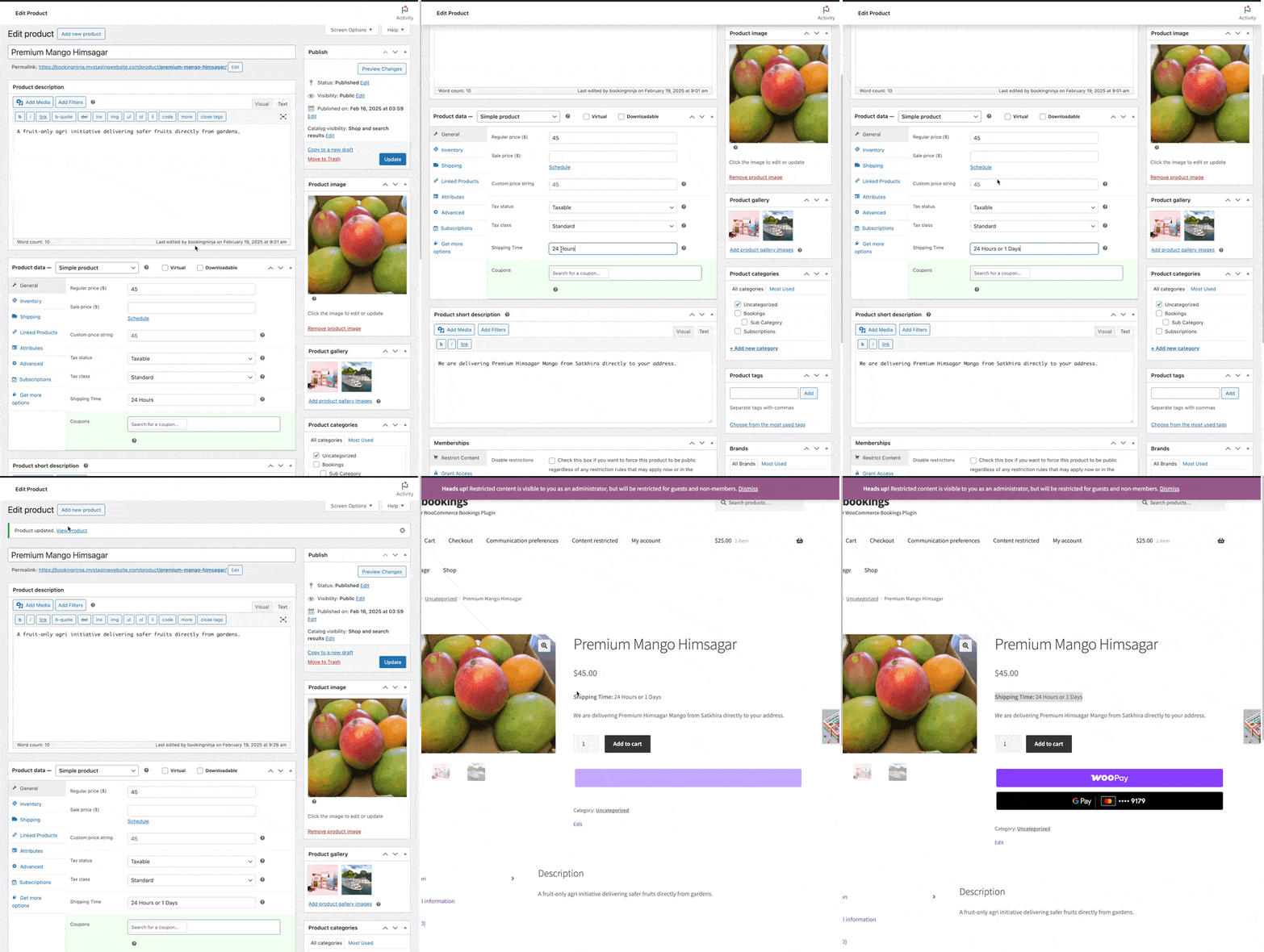
I created the WooCommerce Shipping Time Display extension to solve this exact problem. It’s a simple, easy-to-use extension that adds a shipping time field to WooCommerce products and automatically shows it on the product page.
Here’s how it works:
-
Adds a “Shipping Time” field to the WooCommerce product editor.
-
Displays shipping time on the product page automatically.
-
Lightweight & easy to use - just install, activate, and enter your shipping time.
No unnecessary features, no bloated settings - just a simple way to show estimated delivery times for customers.
How to Use It in Your Store
If you’re running a WooCommerce store and need to show shipping times on product pages, you can download my WooCommerce Shipping Time Display extension and install it today.
Download from GitHub →Installation Steps:
-
Download the plugin from my GitHub repository.
-
In your WordPress admin panel, go to Plugins > Add New.
-
Click Upload Plugin and select the
.zipfile. -
Click Install Now, then Activate.
Once activated, simply edit any product, enter the shipping time, and it will display for your customers - no extra steps required!
Why This Matters for WooCommerce Store Owners?
This experience was a reminder of why listening to customer feedback is so important. The best solutions come from real problems - not just features we think people need.
If one merchant struggled with this, there are probably thousands of others looking for the same thing. That’s why I’m sharing this plugin - it’s free, open-source, and designed to help WooCommerce store owners provide a better experience for their customers.
Final Thoughts
Building this plugin made me realize how many small but essential features are missing from WooCommerce by default. If you run a WooCommerce store and want to improve your shipping communication, this plugin is for you.
I’d love to hear what you think! If you try it out, let me know how it works for your store - or suggest improvements on GitHub.
And if you ever have a WooCommerce challenge that doesn’t have an easy solution? Reach out. You never know - it might just inspire the next great plugin.