As a WooCommerce Happiness Engineer, my day starts with chatting with store owners - helping them navigate their dashboards, troubleshoot quirks, and fine-tune their stores. Every WooCommerce update brings something new, and one day, after a routine release, I noticed a small but significant change in the admin sidebar.
A shiny new “Payments” tab.
“Oh, interesting!” I thought. A dedicated place to manage payments? That could be useful.
But before I even had a chance to explore it properly, the WooCommerce community forums lit up with questions:
-
How do I remove this Payments tab? I already have my payment setup, and I don’t need this extra menu.
-
I’m not using WooPayments. Can I clean this up?
-
Love WooCommerce, but I like a tidy dashboard. Any way to hide this?
The concerns made total sense.
While WooPayments is an excellent option - offering smooth checkout experiences, built-in subscriptions, and real-time payment tracking - not every store owner wanted it front and center in their admin panel. Many were already using Stripe, PayPal, or other gateways, or couldn’t even use WooPayments due to country restrictions.
For them, this extra tab was just unnecessary clutter.
That’s when I knew I had to help.
Instead of recommending yet another plugin (because let’s be real, we all try to avoid unnecessary plugins), I found a simple code snippet that removes the tab entirely. No fuss, no bloat - just a clean WooCommerce dashboard, exactly how you want it.
Why Does the “Payments” Tab Exist?
Before we dive into the fix, let’s quickly discuss why WooCommerce introduced this tab in the first place:
-
Centralized Payments Management – It provides a one-stop interface to handle all payment-related settings.
-
Promoting WooPayments – If you weren’t already using it, WooCommerce gently nudges you to consider their native payment solution.
-
Streamlined Checkout Experience – WooPayments integrates smoothly with features like subscriptions, express checkout, and even Buy Now, Pay Later (BNPL) options.
But if you’re not planning to use WooPayments, having this tab can just feel like unnecessary clutter.
The Simple Way to Remove the “Payments” Tab
If you’re like me and prefer a clean, distraction-free WooCommerce admin panel, the good news is - you can remove the Payments tab in just a few seconds. No extra plugins, no unnecessary bloat.
All you need is this simple code snippet:
add_action( 'admin_menu', 'woo_remove_payments_from_wp_sidebar_menu', 9999 );

function woo_remove_payments_from_wp_sidebar_menu() {
   remove_menu_page( 'admin.php?page=wc-settings&tab=checkout' );
   remove_menu_page( 'admin.php?page=wc-admin&path=/wc-pay-welcome-page' );
   remove_menu_page( 'admin.php?page=wc-admin&task=payments' );
   remove_menu_page( 'admin.php?page=wc-admin&task=woocommerce-payments' );
}
How to Add This Code?
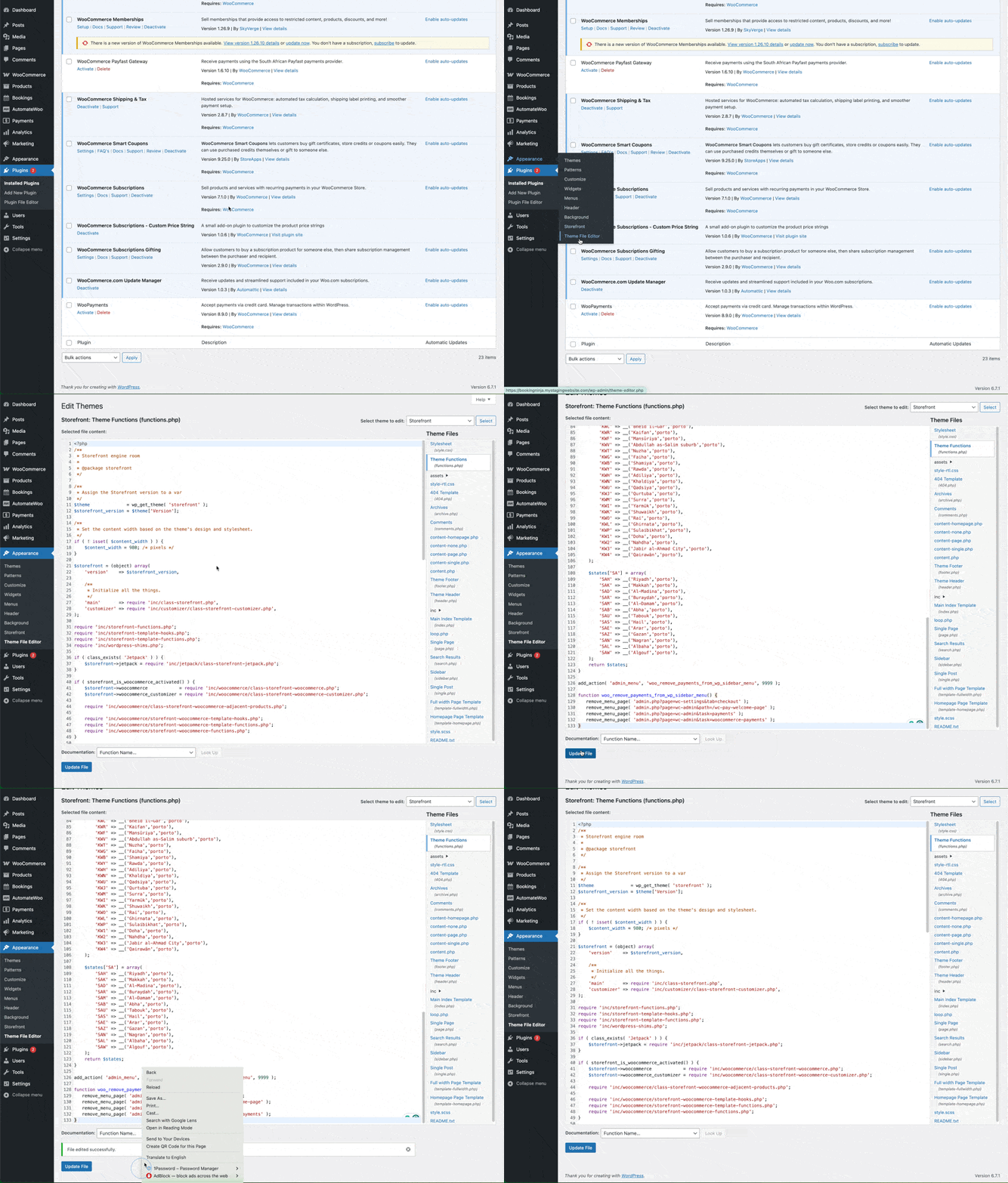
You can add this snippet directly to your site by following these steps:
-
In your WordPress dashboard, navigate to Appearance → Theme File Editor.
-
Locate and click on functions.php from the list of theme files.
-
Scroll down to the bottom of the file.
-
Copy and paste the code snippet above.
-
Click Update File to save your changes.
-
Refresh your WordPress admin panel, and voilà - the Payments tab is gone! 🎉
Bonus: Need the Tab Back?
If you ever change your mind and want to restore the Payments tab, it’s just as easy: Simply remove the snippet from your functions.php file and refresh your dashboard. The tab will return instantly.
What else?
WooCommerce is incredibly flexible, and that’s one of the things I love most about it. Whether you’re using WooPayments or sticking with Stripe, PayPal, or another provider, your admin panel should work for you, not against you.
By removing unnecessary clutter, you can keep your workflow clean, efficient, and distraction-free.
So, if you’re ready for a tidier WooCommerce experience, give this snippet a try and enjoy your streamlined dashboard.
Let me know in the comments - are you keeping the Payments tab or saying goodbye to it?