A store owner once asked me for a print button on the WooCommerce order screen. I wrote a snippet that adds a View or Print Receipt order action. It opens the customer’s order received page, and you print that from the browser.
That page is part of the storefront, so the printout carries your theme’s header, menu, and footer too. I tested for this post on WooCommerce 11.2.1 and found a better source sitting in core. WooCommerce can build a plain receipt for any order, and the mobile apps already use it. Nothing in wp-admin links to it.
TLDR
WooCommerce has no print button for orders. Core can build a printable receipt through the
wc/v3/orders/{id}/receiptREST endpoint, and the snippet below turns that into a Print receipt order action. For invoices, packing slips, or printing many orders at once, use a plugin such as PDF Invoices & Packing Slips for WooCommerce.
What WooCommerce gives you without a plugin
Open any order in WooCommerce > Orders and check the Order actions box. On my test store it lists three actions: send order details to the customer, resend the new order notification, and regenerate download permissions. None of them prints anything.
Your customers can print their side from the browser, using the order received page after checkout or the order view in My account. That’s also what my old snippet relies on.
The receipt builder lives in src/Internal/ReceiptRendering/ in the WooCommerce plugin. Its REST controller adds two routes:
POST /wp-json/wc/v3/orders/{id}/receiptbuilds a receipt and returns its URL.GET /wp-json/wc/v3/orders/{id}/receiptreturns the receipt that already exists.
Both need the read_shop_order capability, so only people who can see the order can make a receipt for it. The WooCommerce iOS app reads the same receipt_url field from that endpoint in its receipt model.
Add a Print receipt button to the order screen
The snippet adds a Print receipt action to the Order actions box. When you apply it, it asks core for a fresh receipt and opens it in the same tab. Add it to your child theme’s functions.php or to a code snippets plugin like WPCode.
// Adds a "Print receipt" order action that opens the receipt WooCommerce core builds.
add_filter( 'woocommerce_order_actions', function ( $actions ) {
	$actions['wcwiz_print_receipt'] = 'Print receipt';
	return $actions;
} );

add_action( 'woocommerce_order_action_wcwiz_print_receipt', function ( $order ) {
	// Same endpoint the WooCommerce mobile apps use. force_new rebuilds it after order edits.
	$request = new WP_REST_Request( 'POST', '/wc/v3/orders/' . $order->get_id() . '/receipt' );
	$request->set_param( 'force_new', true );
	$response = rest_do_request( $request );

	if ( $response->is_error() ) {
		return;
	}

	wp_redirect( $response->get_data()['receipt_url'] );
	exit;
} );
To use it, open an order, pick Print receipt in the Order actions box, and click the arrow next to it. On my test store this is what came back for a two-item order paid by card:
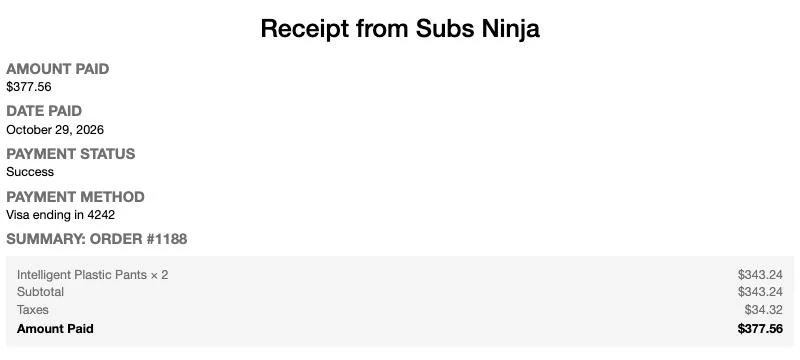
The receipt core built for test order #1188, with no theme around it.
From there, Ctrl + P or Cmd + P prints it or saves it as a PDF.
The snippet calls the endpoint with rest_do_request(), so it runs inside WordPress as the logged-in user. No API keys, and the same capability check applies. Without force_new, core hands back the receipt it made last time, even if you edited the order since.
What the core receipt leaves out
This is a payment receipt, not an invoice or a packing slip. It shows the amount paid, date, payment status, payment method, each line item, and totals for discounts, fees, shipping, and taxes. It has no billing or shipping address and no logo. If you’re printing orders to pack boxes, it’s the wrong document.
You can change it with three filters from core:
woocommerce_printable_order_receipt_datachanges the data before it renders.woocommerce_printable_order_receipt_line_item_display_datachanges each line item row.woocommerce_printable_order_receipt_csschanges the styles.
Two more details. The receipt is saved as a file at a URL like /wc/file/transient/7eaa1e..., and anyone with that link can open it until it expires. The default expiry is the next day. Also, ReceiptRendering sits in the Internal namespace, and the WooCommerce src README says code there isn’t public. The REST route is the safer piece to build on, so the snippet only talks to that.
When you need invoices, packing slips, or bulk printing
This is where a plugin earns its place. These are the ones I’d look at, with numbers from WordPress.org and WooCommerce.com on October 29, 2026:
- Emboss – PDF Invoices and Packing Slips for WooCommerce is free with no premium tier. It makes invoices, receipts with a PAID badge, packing slips, and credit notes, with a bulk ZIP download from the orders list.
- PDF Invoices & Packing Slips for WooCommerce by WP Overnight is free, has over 300,000 active installs, and was last updated on October 22, 2026.
- WebToffee PDF Invoices, Packing Slips, Delivery Notes & Shipping Labels is free and has over 50,000 active installs.
- Print Invoice & Delivery Notes for WooCommerce by Tyche Softwares is free and has over 30,000 active installs.
- Print Invoices and Packing Lists for WooCommerce by SkyVerge is $79 a year and adds pick lists, one combined list across several orders sorted by product category.
I’d start with Emboss. It’s free with nothing locked behind a paid version, and one plugin covers invoices, receipts, packing slips, and credit notes for refunds. You can set your own invoice number format, and the documents attach to WooCommerce emails and show up in the customer’s My account. Move to the SkyVerge one when you need pick lists for a warehouse.
Printing orders automatically
Some stores want a printer next to the kitchen or the packing table that prints each order as it comes in. Automatic Order Printing for WooCommerce by Procomltd does that for $119 a year. It sends invoices and packing slips to a printer when an order is placed, paid, or changes status, through PrintNode or PrintTrigger. Those are cloud print services with desktop software that runs on a computer connected to your printer.
If all you need is a clean copy of one order now and then, the snippet above is enough. Once you’re printing every order to ship it, a packing slip plugin will save you more time than anything core can give you.